Hah, if you ever used the N800 media player you will have been exposed to a tiny bit of my code. Some of the UI polishes and usability tweaks were mine. (Well, someone else had figured out they needed to be done and the bug landed on my lap...)
"/* Here be dragons */" in a particularly hideous d-pointer punching chain must have been a surprise for whomever eventually picked it up.
> "if AD and GPO are now dead, what killed them and what are the options?"
The changing world. AD and GPO come from the mid 1990s before pervasive internet, before WiFi, before Cloud computing, before people had multiple computers, before iPhones, before AWS cloud infrastructure, before Kubernetes, before cheap fast hardware for virtualization, before cheap bulk storage, before BYOD and WFH and everything-as-web-app. Before that was the world of isolated 8-bit machines, expensive Solaris workstations and Unix mainframes with expensive admins, and after say 1998 the world was cheap Compaq/HP/IBM hardware running Windows server and Windows 9x desktop, and after about 2003 it was Windows Small Business Server (AD, GPO, SQL, Exchange, SharePoint) and XP Pro desktops.
Cracks started showing when people wanted to logon to a laptop away from the office when it couldn't refresh policies, run logon scripts, talk to domain controllers; when people wanted 'offline files' from a company file share while away from the office, but wanted their corporate email to work when their laptop was online but not pull down company settings over a dialup modem. More cracks when they got a Blackberry or iPhone, more when AppStores appeared and people expect to be able to install whatever they like, more with the rise of Apple Macbooks, with the growth of website based services people can use from anywhere, more with Amazon AWS where company infrastructure is on someone else's premises, more with BYOD and WFH, more with people expecting software to be cost-free, being trivially able to spin up Linux web and database servers because there was plenty of CPU/RAM/Disk and no worries about licensing costs.
> "it’s nice in that admins can’t screw around too much with my system"
If it's a company device, it isn't your system. The company has legal oblications and practical concerns that conflict with your desires as an individual. That might be pushing full-disk encryption or updates, or auto-locking, or restricting use of USB or websites to block potential customer information leak points, or trying to stop you saving work locally that might be lost if the device fails, or trying to stop your device being an entry point for malware or ransomware, or trying to stop you screwing around with their system which costs them employee time to fix and your downtime while it's broken.
Group policy just sets registry keys. That's nothing you can't do any other way. The important bit is the inertia of 30 years of Windows subsystems and integration with Active Directory and 3rd party Windows ecosystem software all being written to expose internal config and look to registry keys for the settings.
For the first part, Group Policy (GPO) can set the screen to lock after 2 minutes of inactivity, say, which works because there are Windows subsystems built to look for a reg key for their config, and policy templates exposing that config in the GUI management tools. Or group policy configures which security group can "logon as a service" which works because Windows has system-wide and domain-wide pervasive Access Control Lists (ACLs). GPO configures that Background Intelligent Transfer Service (BITS) should limit its bandwidth use, which works because Windows Updates use BITS. Or sets the machine-wide SSL cipher order, because Windows software uses system-wide schannel not OpenSSL. Or GPO sets what your default printer will be and that's only useful because decades of 3rd party Windows software was written to use the standard Windows printer dialog, or User Documents path, or whatever.
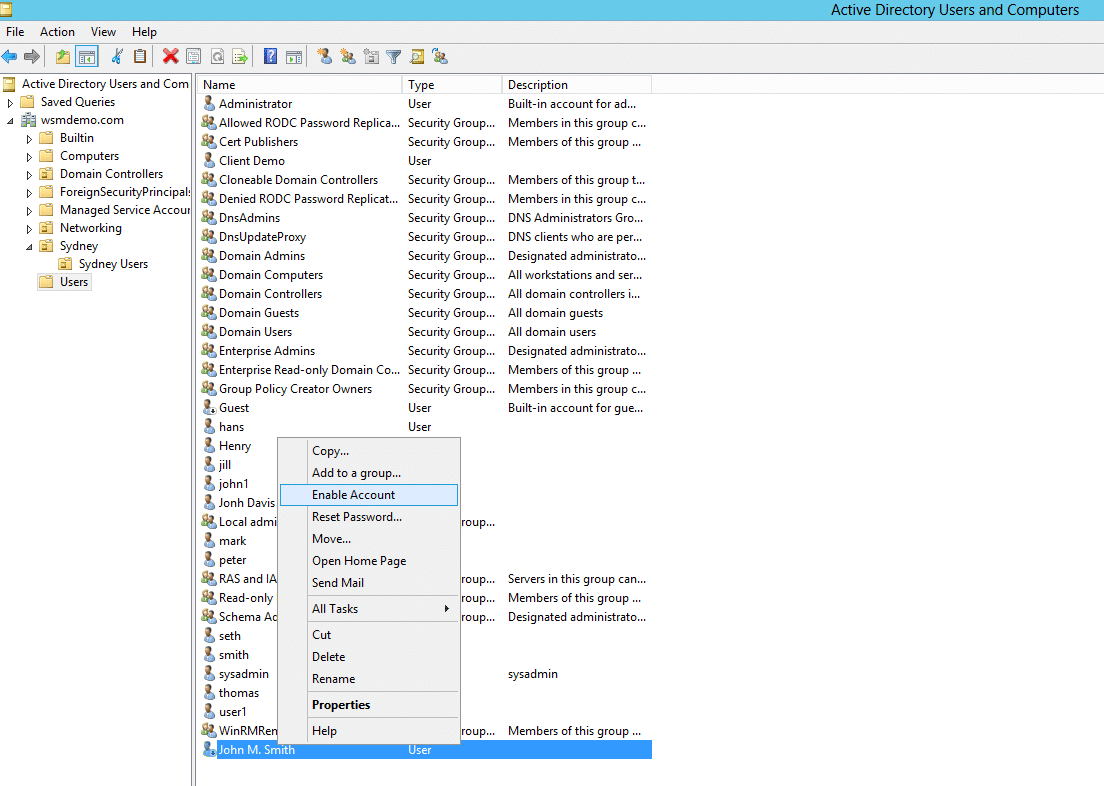
For the second part, Active Directory is a tree-shaped organization tool; in screenshot[5] that I quickly Googled, the tree on the left has a folder named "Sydney" and below that "Sydney Users"; this lets sysadmins organise the company computer accounts, user accounts, and security groups by whatever hierarchy makes sense for that company - e.g. by country, office, team, department, building floor, etc. Then Group Policy overlays on that structure, and the policies are composable.
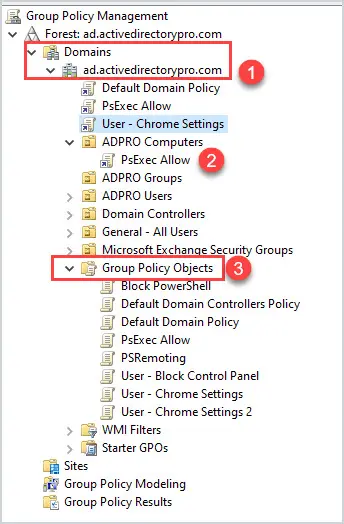
e.g. in this basic screenshot of the group policy manamement GUI[6] it's showing at the bottom a list of all group policy configurations that have been made in a domain such as "Block PowerShell", and higher up it shows the policy "PsExec Allow" has been linked inside the "ADPRO Computers" folder. So users and computers in that folder in AD, will get those policies applied. In screenshot[7] you can see a basic example showing corporate computers getting machine-wide settings, corporate users getting user-level MS Office config, and Executives get settings that nobody else gets. (This echoes the registry having separate HKEY_LOCAL_MACHINE and HKEY_CURRENT_USER subtrees). Screenshot[8] shows the relatively tidy GUI on the right for seeing which settings have been configured in a policy.
If you apply more than one GPO to a folder, the users/computers will get the all the policy settings combined. This is often what people complain about when logging on to a corporate Windows machine takes ages, btw. You can filter GPOs on a case-by-case basis to build patterns like "apply this machine-wide policy to all computers in the Sydney folder which are members of the WarehouseComputer security group" or "apply these logon-settings to employees in New York who are members of Finance and logging onto a laptop". So companies which have been around for years can have really (messy) big and intricate designs which would be a lot of work to migrate.
3rd party programs can release XML files which plug into the GPO management, and the programs were written to expect to be configured by registry keys so they can pick up those settings; there are templates for configuring FireFox[1], Chrome[2] Adobe Acrobat[3], Word, Excel, Office[4], VMWare Horizon, Lenovo Dock Manager, Zoom, RealVNC, LibreOffice, Citrix, FoxIT Reader, and so on. The more enterprisey a tool is, the more likely it will plug into that ecosystem. Then all kinds of 3rd party reporting and auditing tools look there to see if your company is compliant with this or that; the whole thing is integrated with Windows' domain-wide ACLs so you can give some admins permissions to view or edit just their regional subset of this.
As usual the lockin is not that they do something amazing that nothing else can do, the lockin is that Windows domains have been around in this format for 30 years since NT4 and Windows 2000, and it has huge inertia, familiarity, is deeply embedded in a lot of companies, you can easily and cheaply hire lots of people who know how to use and manage it, you can send screenshots of it to auditors and they understand it, if you don't know how but you have a bit of (oldschool) Windows experience then clicking around will get you the basics, you can buy 3rd party auditing software that will send you a management friendly report with green ticks saying almost everything is fine but you should change this setting for security...
[Yes of course you can build your own custom replacement for every single thing, just like you can build your own custom replacement for any software; it's "just" ldap and kerberos and dns and some scripts and site-to-site policy replication and management tools und und und].
My parent made a claim that humans have separate pathways for data and instructions and cannot mix them up like LLMs do. Showing that we don't has every effect on refuting their argument.
>>> The principal security problem of LLMs is that there is no architectural boundary between data and control paths.
> "science fiction books that explore interesting ideas?"
I think that's a big part of being in the Sci-Fi genre and I don't really get people whinging about writing style - this isn't Chaucer, it's fun geeky ideas. I second basically any Greg Egan and Charles Stross and Arthur C. Clarke stories, and:
Vernor Vinge's trilogy: A Deepness in the Sky, A Fire Upon the Deep, Across Realtime. Ideas from "World War II on an alien planet around a variable star where the whole planet freezes every few years" to timewarp bubbles, galactic zones of thought, cyborg enhancements, semi-sentient plants.
Children of Time by Adrian Tchaikovsky - what if we use genetic engineering to forcibly evolve monkeys towards human intelligence? Whoops our virus infected spiders instead.
Project Hail Mary by Andy Weir - much lighter Hollywood popcorn-action sci-fi, a potential world-ending threat and a cool alien encounter.
The Lathe of Heaven by Ursula K. LeGuin - What if a guy's dreams could change reality, he sees a therapist who has a dream-influencing machine and wants to take over the world.
Peter F. Hamilton trilogies, much more fantasy mixed with sci-fi but has future Space Opera ideas - genetically engineered, cyborg enhanced, mind uploaded, human factions, several varieties of aliens, various future-techs.
The more likely sounding conclusion is that everyone non-technical at Microsoft (sales, marketing, design, product management) uses macOS and assumes “look like macOS” is automatically good and they’ve never considered anything else.
There’s nothing about C++ which makes it “the only programming language which can draw things on the left”.
The computer I'm writing this on, the earliest things showing in Control Panel were installed in February 2012. It's not a rarely used clean machine, it's a daily use home computer/plaything with a lot of stuff installed/removed over the years from application suites to dev environments and esolangs, to editors, viewers, inspectors, emulators, hypervisors, browsers, chat and streaming clients, game stores, networking tools.
That's not a reason for why I didn't need to wipe and fresh install Windows in 2013, 2014, 2015, 2016, 2017, 2018, 2019, 2020, 2021, 2022, 2023, 2024, which was what qingcharles was claiming he had to do.
See also the Caproni Transaero, which isn't totally ugly but is messy in a "maybe more wings is better? some pushing engines at the back?" kind of way.



Microsoft bought Nokia's devices and services division for Windows Mobile in 2014. https://en.wikipedia.org/wiki/Microsoft_Mobile
reply