Everyone is quite right there have been systems like this available to the “Pro User” for a long time but what’s different here is it’s being brought to the main stream. They are taking a niche professional tool and making it available in a “just works” way to literally everyone. A lot of people have a Mac and an iPad, this will be their first experience of this. It’s going to be very popular with people who had no idea it was possible.
The other thing to consider is that Apple will be able to integrate at a lower deeper level than third party apps. It’s the drag and drop between devices that is going to be the game changer, that isn’t currently possible with the iPad with a third party app, the APIs don’t exist.
So yes, it’s not new but it is new to 99% of people. Just like smart phones, tablets or portable music “jukebox” players weren’t new but apple took them mainstream.
This is exactly what Apple have done again and again and yet people are still surprised when it happens.
Touch screens, FaceTime, AirDrop, Handoff, Sidecar. These are generally polished and reliable iterations of existing ideas that don’t require a bunch of other apps and configuration. They are usually marketed and smartly named, unlike Windows where they can’t seem to name anything or features are locked behind different tiers of the OS.
Even the PC Master Race brigade who love to shout that they could build a better machine for less than whatever desktop Apple releases miss the point. Macs are appliances. They work reliably and do so for a long time and you know what you’re getting in terms of functionality.
I’ve never been an real Apple user, however I got a MacBook Pro from my employer. Recently my android broke, and a friend gave me an 2020 iPhone SE as temporary replacement while I look for a replacement.
The thing that really blew my mind was the shared clipboard, I’ve always been sending myself messages through Signal or Discord to share my clipboard. Now it’s just automatic. The only thing I would have liked was a better way to discover this, I only did by accident.
I’ve used KDE connect in the past, and this feels like the polished version of it.
My recent/related iOS hack is screenshotting difficult-to-select text in sites and apps. Live Text immediately performs OCR on the screenshot and the text can then be copied/pasted.
For the windows and Android users (of which I am one), the first party "your phone" app in windows 10/11 gives you this along with a lot of other amazing features (running your phone apps on desktop, access to photos and sms, notifications, calling and answering through your computer).
It’s the kind of thing they’ll talk up and demo at their keynotes and maybe on their webpage when the latest OS drops, so unless you’re actively paying attention to them all of this goes unseen. Sometimes the annoying tips app may pop up and tell you too.
Yeah, I'm pretty new to the ecosystem and I frequently have a nagging feeling that I should do a deep dive into documentation and guides just to catch up. Especially when it comes to wrangling Finder.
While you are at it take a look at all the trackpad gestures. They are quite useful. I wasn’t aware of two of them for a long time. Four finger close gesture to show all the apps. Two finger swipe from the right edge to open up notifications tray.
Yeah, the Trackpad section in Settings is absolutely fantastic at teaching these options.
Thanks for reminding me about it. My problem has been kinda the opposite: I trigger the notification center by accident too often. So this was enough for me to finally rebind it to a hot corner.
Ha I also discovered this by accident, mind blown. Do you know about the long press space bar that turns it in a sorta ‘trackpad’ to move the cursor around in text (ios)?
You can also scan a document from your iPhone and insert the image anywhere from the context (right click) menu. All it’s really doing is removing a few steps from the need to unlock your phone, open the notes app, select the scan document option and share/airdrop the result. It’s simple and effective.
I’ve seen so many students upload images for online exams via things like cam scanner unaware that they don’t need third party solutions. They complain about the time needed to get the images off their phones and onto their laptops for exams because of these supposedly hidden features.
(On Windows you can browse your android’s phone’s photos via the photos app via USB)
Similarly they go to extremes with various oddball apps to make PDFs with cam scanner images in all sorts of orientations with nasty watermarks because they’re unaware of the power of Preview.
Highly underrated, and highly unknown feature. If someone emailed you a PDF, you can literally sign it and reply to the email all within Mail. Using you saved signature. Quite heavenly.
Also most people don’t know that when you Screenshot a webpage, there’s actually a tab at the top to capture the entire webpage (even if it’s way taller than your screen) as a pdf. Essentially “print to pdf”.
Continuity has been a wonderful feature that I use only from time to time, but when I use it it's been absolutely glorious in removing mental friction for menial tasks. Copying TOTP codes is one thing that just makes 2FA that much less of an annoyance.
It's infectious. So much so that I'm constantly annoyed that Music supports neither Continuity nor some form of remote control. It feels like the feature was released and then they suddenly stopped adding more apps to support it.
With a HomePod you can transfer music from a phone to the speaker by holding it near it. It’s not AirPlay it just switches over. A similar feature for MacOS would be nice.
You can also use an Apple Watch as a remote for music playing on any device in your home. Apple want your money.
If you’re on your Mac or iOS device and you get a sms with a 2FA code the OS pops the code up for you for autocomplete. You can have iMessage send and receive sms from macOS.
>Even the PC Master Race brigade who love to shout that they could build a better machine for less than whatever desktop Apple releases miss the point.
Apple locks their ecosystem so nobody else can make a smooth seamless experience. They ensure that only they can deliver such an integrated experience. I respect the effort of their engineers, but there are countless smart UX people and engineers in the world.
>Apple locks their ecosystem so nobody else can make a smooth seamless experience
KDE Connect and GS Connect do virtually the same things between Linux and Android, and sometimes even more than what Apple can do[1], and is proof that you don't need vendor lock-in and a 3 trillion $ valuation to achieve the same features, just a group of dedicated enthusiasts with a vision and free time on their hands. That's the beauty of FOSS.
Unfortunately, the Apple apologetics brigade will shout loudly that vendor lock in is the key to Apple delivering these features and that openness is somehow bad as it will only hurt the ecosystem and get you hacked.
Not hating on Apple or Apple users, just stating my POV.
It's entirely possible that a closed ecosystem enables a large number of features with a certain set of tradeoffs, and an open ecosystem enables a large number of features with a different set of tradeoffs, and there is overlap between the feature sets.
Does that mean that there is no need for an open ecosystem, when you can get what you need from a closed ecosystem? No, because while all the features you care about may be in both, the tradeoffs you have to make to use the closed ecosystem might not be the tradeoffs you want to make.
And the converse is equally plausible: That you can get all the features you care about in both, but it does not mean that there is no need for a closed ecosystem, because while all the features someone cares about may be available in both, the tradeoffs they want to make may align more closely with the closed ecosystem's tradeoffs than with teh open ecosystem's tradeoffs.
I think it is true that given some set of features, we can nearly always find a set of open source products/packages to deliver the required functionality, and for a very pedantic literal sense of "need, " OSS does everything people need.
But hardware and software products are more than just a set of features. They're the other tradeoffs that form a messy collection of affordances and pain points, and different people have different needs from the entire product's perspective.
KDE connect does what the Remote Hippo app did a decade ago, from what I’m seeing of it’s documentation - let’s you use your phone as a trackpad and maybe share files and such. Yes, it’s more advanced, but it’s not a rethinking of things.
This feature is indeed innovative yet iterative - it’s like a zero-configuration Synergy or Logitech Flow where you can use the same mouse on multiple devices - but it requires basically no configuration at all to do so. And the impressive part is how it built on top of previous work to add shared clipboard between devices and other “handoff” features, plus has a similarity to features that shipped before handoff such as airdrop.
To underscore how impressive it is, Microsoft still has yet to ship a suite of such features and they should have very similar resources available. Apple might be all marketing and sometimes buggy, confusing or unexpected, but there is an undeniable sense of progression when you look at the 5-10 year improvements.
The caution I would have is that it works so well I was confused when my mouse cursor disappeared and showed up on another screen. And it can’t automatically figure out the positioning of displays or computers, which is annoying now that Apple is experimenting with chips that can precisely position devices relative to each other. [Full disclosure, I have a couple shares in Apple.]
>KDE connect does what the Remote Hippo app did a decade ago, from what I’m seeing of it’s documentation - let’s you use your phone as a trackpad and maybe share files and such. Yes, it’s more advanced, but it’s not a rethinking of things.
It does way more than that:
It will pause your PC music/movie when you get a call.
It lets you sync clipboards.
Syncs notifications, SMS, etc and can even reply to SMS from your PC.
Remote view of photos and files on your phone from the PC.
Take phone call on your PC.
And I might be missing a couple.
But, yes, the fact that Microsoft hasn't delivered such features on Windows is baffling. They did try with the Your Phone app, but that's worse than KDE connect.
SMS sync and taking calls from the computer have been a feature in the apple ecosystem since at least 2017.
I agree with the other commenters - it's nice, but it's not nearly the same. The beauty of it is really that 'it just works' - you don't need to know about it, you don't need to open a specific app, find something by name and press 'connect', there are no options. The behaviour just slots in perfectly between the existing model of icloud / sharing / handoff. This kind of long-term design vision is difficult to achieve and very rare in FOSS, maybe with the exception of Elementary.
>There is no Android and PC that I can buy where KDE connect is just installed and works. That's the difference.
Sure, but now we're moving the goal posts and arguing about semantics. The original comment I replied to, said Apple features are only achievable due to their ecosystem and I disproved him, that's it. The fact that the Linux community doesn't have billions of $ for marketing and commercialization of their products is a separate issue that's been the thorn of Linux adoption on the desktop since forever.
>I buy a new iPad and MacBook, log in with my iCloud account, and boom, it works.
Unfortunately, some people in the world that don't earn western wages can't afford to own several Apple products worth multiple times their salaries to enjoy the ecosystem, so it's great that FOSS alternatives exist that do the same things so those less fortunate can enjoy them at a fraction of the cost.
When I was a young and broke student I had more time to tinker with old computers and free (and pirated) software and get things fun things working. I also hated on Apple.
Now that I have a comfortable middle class western lifestyle I can appreciate the appliance nature of Apple’s products. I use them for work because they are reliable and do indeed just work.
In the lab I can still tinker with computers but I try to leave that to my students so they can have the same wonderful experience I had.
I haven’t build a PC in a few years and hope to build something new in a couple of years. It’s not a monoculture just because I prefer Macs for getting work done and I’m not going to apologise for my situation. Apple know their users and I’m happy that they can meet most of my needs.
I'm in a similar situation...Whats worse is when you compare the Best of Apple with the best of the PC side of things. My work Dell precision is a science workstation desktop replacement...2 hours of battery life I can understand, fuel efficiency wasn't anywhere in the top ten list of priorities.
But it has ZERO sleep modes. There are 4 exposed to the OS in most cases, non are supported by the BIOS...the only thing I can reasonably do is 'hibernate with lid close.'
The mac is half the price, half the weight, twice the CPU...I'm a little disappointed in Dell and sad that my office requires it use.
But in the context of this thread, I really need a dose of humility and a recognition of what I have due to my geography.
No one but apple has access to the apple ecosystem like apple.
In a windows/linux/notApple ecosystem, you've got to give permission to an application to fully control other devices...that's...not a good idea, from a security standpoint. It's how Bonzi Buddy gets a really crappy hold of your information. But apple has spent a lot of time building a reputation where they can be trusted to do so()
>n a windows/linux/notApple ecosystem, you've got to give permission to an application to fully control other devices...that's...not a good idea, from a security standpoint.
Apple should provide safe defaults - but ultimately the user should be making that decision. Its entirely possible to do this safely, Apple simply chooses not to and pretends its something to do with security.
> But apple has spent a lot of time building a reputation where they can be trusted to do so()
Regardless of whatever "reputation" they've built, Apple products are riddled with bugs and security problems. As a technical user, I never think "security" when I think Apple. I guess for most people security is something that is easily marketed.
Feel free to deliver this smooth experience on android or microsofts mobile platforms. The reality for me is that android stuff plays LESS well together and is less smooth.
The polish isn't as shiny as it once was. Let's fix the Music app no? How about passwords? What about the complete failure of a window manager on macOS.
Feature bloat has plagued Apple developers to the point nobody knows how to wrangle all the gestures and interactions properly. Even a man as diligent as Steve, I suspect, wouldn't know what to do with the current state of things. He'd probably just burn it all down and start over with the front end, as is the natural order of things.
Feel the same way. There are some uninspiring apps but they can't update all apps all the time. 2 things matter: 1) they are not being decprecated or ignored. Thats for google to do. and 2) when they do finally get a non-incremental update, they usually are much better. Meaning, they batched together a bunch of things that were true problems and fixed them in a smart/clever way.
There are a few core features music is missing on top of their semi-unintuitive interface.
For starters, it’s as hard for me to plug my phone in on multiple computers without licensing alerts going nuts/blocking certain songs despite the fact the music was bought through them. That is baffling to me given how synchronized Apple ID usually is.
I know X11 WMs have had all sorts of fancy features for decades, but I've never seen any particular benefit from them personally.
The Mac desktop works extremely well when used more or less as intended for the vast majority of Mac users (ie, on a laptop): with a multi-touch trackpad, flicking rapidly between virtual desktops, and flicking up to see everything at once.
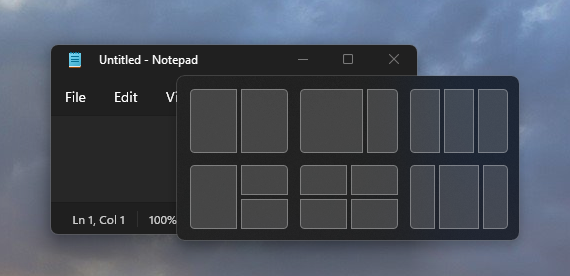
Honestly, that's a terrible workflow for me. Due to the nature of my work, many times I need to tile 2, 3 or 4 windows on the same screen so I can view them all at once. Flicking quickly between them instead of having them all static in front of me is a UX nightmare that gives me eye strain just thinking about it.
I have no idea how people mange to multi task efficiently by flicking and not get headaches, or on desktop with a mouse and keyboard, but maybe Apple thinks most of its customers are content creators who should just be focusing on one app at a time and never need to tile several. I guess I just wasn't meant to be an Apple customer.
For my type of work, I much prefer the Windows/Linux way of having the flicking option for laptops but also great out of the box tiling built in.
You don’t have to flick anything. Windows align against each other and you can position them how you like. You can even configure it to always open specific apps in a particular virtual desktop should you chose.
If you want a full screen app that you flick through like an iPad you can. If you want a mess of windows on one desktop you can use App Exposé to see only the ones from a particular app. If you want a tiling manager you can install one.
If you want to turn off all the gestures you can.
It’s a mature desktop OS that has many ways of doing things.
Yeah, but I don't need any of that swiping most of the time, nor do I wish to install a tiling window manager to do the tiling automatically for me all the time, as I only need the tiling sometimes and I prefer to do the tiling myself.
I just want my OS to give me the option, out of the box, to quickly tile on demand 2 to 4 windows on the same screen in a sane layout that I can choose that's easily resizable to my current needs. That's it.
Apple Music still won't sync all of my wife's MP3 songs to her iPhone 13 Pro, even though she pays for the subscription. Some stuff goes through. Some doesn't. It's very random.
My iPhone X syncs fine, even wirelessly, with the same library, though.
I'm just glad (OK, amazed) that Apple Music still syncs songs with my 17-year-old first-generation iPod Shuffle. I used it just yesterday. My only complaint is that the icon displayed in the Finder sidebar for the second-generation Shuffles has the wrong aspect ratio. Still the best music player on the planet.
I’m curious what era in particular you are talking about. Maybe I have rose tinted glasses but I remember iTunes being pretty great in the late 2000’s/early 2010s.
It’s kind of baffling how clunky/featureless/unintuitive apple’s Music app is, right? Most of their apps are slick and intuitive, but Music is just so…bad. Especially given how amazing iTunes used to be!
People really underestimate the contagiousness of Apple brand names.
Earlier this week I was listening to several non-technical people in the real world talking about their "AirTags." Eventually one of them took hers out, and it turned out they were talking about their Tile trackers. Nobody says "Tile," but everyone says "AirTags" now.
And in my company, everyone says "FaceTime," but nobody means FaceTime because it's a Windows-only organization. They mean Teams, or Zoom, or even BlueJeans, but they never actually mean FaceTime.
It goes all the way down to the naming of system utilities. Disk Utility has a distinct name and icon (and questionable functionality). You can easily find it in Spotlight and launch it with a few key strokes. The familiar icon appears and you’ve found what you want.
In Windows you search for Disk Management and you not only have to type the entire name but the result you get is not the program you’re looking for but some long winded description that makes you stop and have to decipher it. It adds friction and confusion.
At least since Windows 10 Start-X opens a useful list of utilities.
Legitimately asking this: how so? I don’t really have any issues with it and I’m formatting drives all the time off of it. Are there some other features that are janky?
When Apple does this, it's really hard to undersell the "reliable" aspect of it.
The responsiveness and web experience of the first iPhone was just, a generational leap.
Same thing with Universal Control. I've used Synergy, ShareMouse and basically every clone, and I've never seen close to this same precision as Universal Control which Just Works out of the box.
I'm actually upgrading to a new Mac right now, and Universal Control is an absolute game changer for that workflow.
The smug face I had while making similar claims with so much confidence and zeal got crushed when started seeing weird shit like the infamous green lines on the screen and the fucking "stage light effect".. I love how even embarrassing failures of this company have fancy names!
For me the "just works" that does it is the seamless copy and paste between my Macbook and iPhone, I never set it up and honestly I don't even looked how it works, it's just here when I need it.
Apple also locks down their ecosystem so nobody except them can actually make a "just works" product. How many smart UX people and engineers do we have on HN itself?
"But Apple has to lock it down, otherwise it would be a shitty ecosystem, just look at Windows lol" is a lame defense (IMO). There are countless ways to design open APIs, open data standards, etc while still having sane defaults for the non-pro users.
That is a very fair point. I think it starts at the leadership level which prioritizes things like UX, quality of materials used in construction, etc, etc. You need people at the top that are not just bean counters.
I enjoyed the drag and drop between windows and Samsung Galaxy device. It's certainly not as great as the highlighted apple's one, but it was really super nice!
This insight seems to be key -- thanks for sharing.
Pity that MG Siegler did not realise the opportunity to report more than what goes beyond an off-puttingly biased and superficial analysis. I recall his TechCrunch times more favourably; this article in contrast seems to not only have been written in haste, but written poorly at that.


The other thing to consider is that Apple will be able to integrate at a lower deeper level than third party apps. It’s the drag and drop between devices that is going to be the game changer, that isn’t currently possible with the iPad with a third party app, the APIs don’t exist.
So yes, it’s not new but it is new to 99% of people. Just like smart phones, tablets or portable music “jukebox” players weren’t new but apple took them mainstream.